
Category Archives: ONTAP

ADP(v1) and ADPv2 in a nutshell, it’s delicious!

Ever since clustered Data ONTAP went mainstream over 7-Mode, the dedicated root aggregate tax has been a bone of contention for many, especially for those entry-level systems with internal drives. Can you imagine buying a brand new FAS2220 or FAS2520 and being told that not only are you going to lose two drives as spares, but also another six to your root aggregates? This effectively left you with four drives for your data aggregate, two of which would be devoted to parity. I don’t think so. Now, this is a bit of an extreme example that was seldom deployed. Hopefully you had a deployment engineer who cared about the end result and would use RAID-4 for the root aggregates and maybe not even assign a spare to one controller, giving you seven whole disks for your active-passive deployment. Still, this was kind of a shaft. In a 24-disk system deployed active-active, you’d likely get something like this:

Traditional cDOT

Enter ADP.

In the first version of ADP introduced in version 8.3, clustered Data ONTAP gained the ability to partition drives on systems with internal drives as well as the first two shelves of drives on All Flash FAS systems. What this meant was the dedicated root aggregate tax got a little less painful. In this first version of ADP, clustered Data ONTAP carved each disk into two partitions: a small one for the root aggregates and a larger one for the data aggregate(s). This was referred to as root-data or R-D partitioning. The smaller partition’s size depended on how many drives existed. You could technically buy a system with fewer than 12 drives, but the ADP R-D minimum was eight drives. By default, both partitions on a disk were owned by the same controller, splitting overall disk ownership in half.
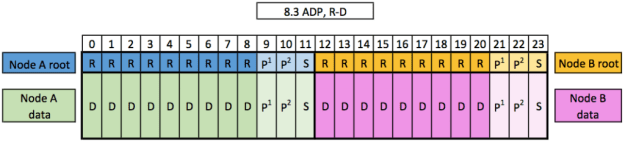
8.3 ADP, R-D


You could change this with some advanced command-line trickery to still build active-passive systems and gain two more drive partitions’ worth of data. Since you were likely only building one large aggregate on your system, you could also accomplish this in System Setup if you told it to create one large pool. This satisfied the masses for a while, but then those crafty engineers over at NetApp came up with something better.

Enter ADPv2.

Starting with ONTAP 9, not only did ONTAP get a name change (7-Mode hasn’t been an option since version 8.2.3), but it also gained ADPv2 which carves the aforementioned data partition in half, or R-D2 (Root-Data,Data) sharing for SSDs. Take note of the aforementioned SSDs there, as spinning disks aren’t eligible for this secondary partitioning. In this new version, you get one drive back that you would have allocated to be a spare, and you also get two of the parity drives back, lessening the pain of the RAID tax. With a minimum requirement of eight drives and a maximum of 48, here are the three main scenarios for this type of partitioning.

12 Drives:

ADPv2, R-D2 ½ shelf

24 Drives:

ADPv2, R-D2 1 shelf

48 Drives:

ADPv2, R-D2 2 shelves

As you can see, this is a far more efficient way of allocating your storage that yields up to ~17% more usable space on your precious SSDs.

So that’s ADP and ADPv2 in a nutshell—a change for the better. Interestingly enough, the ability to partition disks has lead to a radical change in the FlashPool world called “Storage Pools,” but that’s a topic for another day.

ONTAP 9.0 is here.

That’s right folks, not the 8.4 you were thinking was next, but straight to 9. With the jump to 9 in the versioning also comes a bit of rebranding. When referring to the OS of your FAS, you can finally simply say ONTAP, no more qualifying that with “7-mode” or “clustered” or even prefixing it with “Data”. Alongside this new version comes two variants, one that runs in the cloud and one that you can run in your VMware environment. ONTAP Cloud and ONTAP Select respectively. Currently ONTAP Cloud is AWS only, but all signs point to an Azure release in the very near future. ONTAP Select picks up where Edge left off.

I’ve had some helm time with the new version and the first thing you’ll notice is that System Manager has been cleaned up and rearranged. When you first login, you’ll now get the following dashboard with a quick view of your cluster:

Screen Shot 2016-05-30 at 4.58.02 PM

This dashboard is good for a quick glance at performance and capacity, but clicking around the other tabs still leaves something to be desired on the usability front, but only because there is just so much available in this interface. I feel like I’ve got the “advanced view” option permantly checked off. Personally I don’t mind all the various tabs and sub-tabs, but for your day-to-day operator, most of the options available aren’t necessary.

Moving over to the technical side of the equation, ONTAP 9 brings with it a few new exciting features. First of all, support for the new 15.3TB SSDs makes its way into the payload, as well as RAID-TEC triple-parity protection. As far as I know, NetApp will be first to market with these 15.3’s and I can’t wait to see them in the field. RAID-TEC, or RAID Triple Erasure Coding will really help out with the larger disk sizes. While it won’t be mandatory for the large SSDs, I highly recommend it for spinning drives >= 6TB. These drives currently have a max RAID group size of 14, but the introduction of RAID-TEC will increase that to 28 drives. This will not only double your RAID protection level and decrease rebuild times,  but most importantly the RAID tax won’t be so bad in the larger deployments. If you’ve already got these large drives deployed, you can move to RAID-TEC and larger RAID groups provided you have the disks to add to the aggregate.

In the realm of performance, NetApp is claiming a 60% increase in IOPS over 8.3.1, as well as the introduction of “Headroom for visibility of performance capacity”. What this means is that at a glance, you should be able to see how much more performance is left in your cluster. NetApp has also introduced a new data-reduction technology called Data Compaction. With this latest addition to the existing data reduction tricks, namely deduplication, compression, cloning and thin-provisioning NetApp is now boasting a 4:1 data reduction number and is backing it with a guarantee.

Finally, two more feature introductions for the compliance-minded folks out there. First you’ll be happy to hear SnapLock® software is back, and for those not looking to introduce the cost and complexity of an external key manager for NSE drives, NetApp has introduced an onboard key manager.


Make sure to check out some of the other posts on this subject by my fellow NetApp A-Team members:

***Note: ONTAP 9 is not out yet, but the details are. The exact release date is not public yet.